返回
Featured image of post 将 OpenList 嵌入到 Hugo 的 Stack 博客主题

将 OpenList 嵌入到 Hugo 的 Stack 博客主题

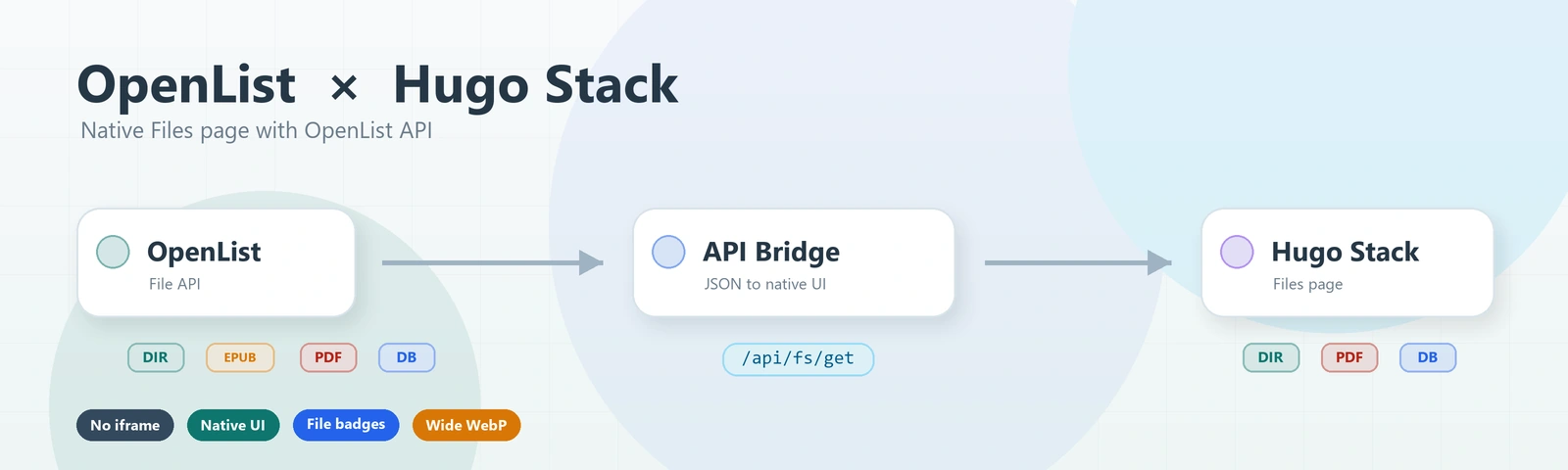
记录如何把 OpenList 作为 API 数据源嵌入 Hugo Stack 主题,并做成博客原生风格的 Files 页面。

这篇文章记录一次把 OpenList 嵌入 Hugo Stack 主题的过程。

这里的“嵌入”不是使用 iframe 直接套 OpenList 原页面,而是把 OpenList 当作文件数据源,通过 OpenList API 读取目录和文件直链,再在 Hugo 的 Stack 主题里重构一个更像博客原生页面的 Files 页面。

最终效果是:

  • 左侧菜单新增 Files 入口。
  • 页面地址是 /files/
  • 页面不渲染 OpenList 原界面,只展示博客风格的文件列表。
  • 支持点击目录进入下一级。
  • 支持点击文件后通过 OpenList 获取 raw_url 并下载。
  • 文件夹、PDF、电子书、图片、代码、压缩包等通过小图标颜色区分。

前置条件

OpenList 需要允许游客访问公开目录,否则 Hugo 前端调用 /api/fs/list 时会收到未登录错误。

我这里示例使用的 OpenList 地址是:

1
https://openlist.example.com:5244

下面正文里如果再次出现 https://openlist.example.com:5244,也都是我的示例地址。你实际照着做时,请统一替换成你自己的 OpenList 域名、协议和端口。

我这里博客地址是:

1
https://bhb6.top

因为是前端直接调用 OpenList API,所以 OpenList 还需要允许跨域访问。如果你没有单独改过,OpenList 默认 CORS 通常是允许的;如果你自己收紧过 CORS,就需要把博客域名加入允许列表。

如果你需要自己配置 CORS,记得填你自己的博客域名,不要直接照抄我这里的 https://bhb6.top

改动路径总览

这次主要改这些路径:

1
2
3
4
5
content/page/files/index.md
assets/icons/files.svg
layouts/page/attachments.html
themes/hugo-theme-stack/assets/scss/custom/12-attachments.scss
themes/hugo-theme-stack/assets/scss/custom.scss

其中:

  • content/page/files/index.md 用来创建 Hugo 页面和菜单入口。
  • assets/icons/files.svg 用来给左侧菜单新增图标。
  • layouts/page/attachments.html 用来写 OpenList API 渲染模板。
  • themes/hugo-theme-stack/assets/scss/custom/12-attachments.scss 用来写 Files 页面样式。
  • themes/hugo-theme-stack/assets/scss/custom.scss 用来引入上面的 SCSS 模块。

新建页面内容

新建文件:

1
content/page/files/index.md

添加:

 1
 2
 3
 4
 5
 6
 7
 8
 9
10
11
12
13
14
15
16
---
title: Files
description: 博客附件与公开资料的归档入口
layout: attachments
slug: files
menu:
    main:
        weight: 4
        params:
            icon: files
comments: false
openlistEndpoint: https://openlist.example.com:5244
openlistRoot: /
---

这里整理博客相关文件、公开资料和可下载内容。

这里的 openlistEndpoint: https://openlist.example.com:5244 同样只是示例,实际使用时必须改成你自己的 OpenList 地址,否则页面会去请求我的示例地址。

这里有几个关键点:

  • layout: attachments 会让 Hugo 使用 layouts/page/attachments.html 这个模板。
  • slug: files 会生成 /files/ 页面。
  • menu.main.weight: 4 会把它插入到左侧菜单里,我这里希望它排在笔记下方。
  • params.icon: files 对应后面新增的 assets/icons/files.svg
  • openlistEndpoint 是 OpenList 站点地址,文中的 https://openlist.example.com:5244 只是示例,实际请改成你自己的 OpenList 地址。
  • openlistRoot 是默认展示的 OpenList 根路径,如果只想展示某个子目录,可以改成类似 /calibre-web/books

新增菜单图标

新建文件:

1
assets/icons/files.svg

添加:

1
2
3
4
5
6
<svg xmlns="http://www.w3.org/2000/svg" class="icon icon-tabler icon-tabler-files" width="24" height="24" viewBox="0 0 24 24" stroke-width="2" stroke="currentColor" fill="none" stroke-linecap="round" stroke-linejoin="round">
  <path stroke="none" d="M0 0h24v24H0z"/>
  <path d="M15 3v4a1 1 0 0 0 1 1h4" />
  <path d="M18 17h-7a2 2 0 0 1 -2 -2v-10a2 2 0 0 1 2 -2h4l5 5v7a2 2 0 0 1 -2 2z" />
  <path d="M16 17v2a2 2 0 0 1 -2 2h-7a2 2 0 0 1 -2 -2v-10a2 2 0 0 1 2 -2h2" />
</svg>

Stack 主题的图标通常会通过 partial "helper/icon"assets/icons 里读取,所以文件名要和 front matter 里的 icon: files 对上。

新建页面模板

新建文件:

1
layouts/page/attachments.html

这个模板做三件事:

  • 从 front matter 读取 openlistEndpointopenlistRoot
  • 调用 OpenList 的 /api/fs/list 读取文件列表。
  • 点击文件时调用 /api/fs/get 获取 raw_url,再触发下载。

页面结构如下:

这里直接读取 front matter 里的 openlistEndpoint,不再在模板里内置默认地址。这样就不会把示例地址写死在模板中;如果你复制这段模板,记得一定要在页面 front matter 里显式填写你自己的 openlistEndpoint

 1
 2
 3
 4
 5
 6
 7
 8
 9
10
11
12
13
14
15
16
17
18
19
20
21
22
23
24
{{ define "body-class" }}article-page keep-sidebar{{ end }}

{{ define "main" }}
{{ $openlistEndpoint := .Params.openlistEndpoint }}
{{ $openlistRoot := default "/" .Params.openlistRoot }}

<div class="attachments-wrapper">
    <div class="attachments-container">
        <article class="main-article page-intro-compact">
            <header class="article-header">
                {{ partial "article/components/details" . }}
            </header>
            {{ partial "article/components/content" . }}
        </article>

        <section class="attachments-shell" data-openlist-endpoint="{{ $openlistEndpoint }}" data-openlist-root="{{ $openlistRoot }}">
            <nav class="attachments-breadcrumb" id="attachmentsBreadcrumb" aria-label="当前附件路径"></nav>
            <div class="attachments-alert" id="attachmentsAlert" hidden></div>
            <div class="attachments-list" id="attachmentsList" aria-live="polite"></div>
        </section>
    </div>
</div>

{{ partialCached "footer/footer" . }}

核心脚本如下,直接放在上面结构后面,仍然在 {{ define "main" }} 内:

  1
  2
  3
  4
  5
  6
  7
  8
  9
 10
 11
 12
 13
 14
 15
 16
 17
 18
 19
 20
 21
 22
 23
 24
 25
 26
 27
 28
 29
 30
 31
 32
 33
 34
 35
 36
 37
 38
 39
 40
 41
 42
 43
 44
 45
 46
 47
 48
 49
 50
 51
 52
 53
 54
 55
 56
 57
 58
 59
 60
 61
 62
 63
 64
 65
 66
 67
 68
 69
 70
 71
 72
 73
 74
 75
 76
 77
 78
 79
 80
 81
 82
 83
 84
 85
 86
 87
 88
 89
 90
 91
 92
 93
 94
 95
 96
 97
 98
 99
100
101
102
103
104
105
106
107
108
109
110
111
112
113
114
115
116
117
118
119
120
121
122
123
124
125
126
127
128
129
130
131
132
133
134
135
136
137
138
139
140
141
142
143
144
145
146
147
148
149
150
151
152
153
154
155
156
157
158
159
160
161
162
163
164
165
166
167
168
169
170
171
172
173
174
175
176
177
178
179
180
181
182
183
184
185
186
187
188
189
190
191
192
193
194
195
196
197
198
199
200
201
202
203
204
205
206
207
208
209
210
211
212
213
214
215
216
217
218
219
220
221
222
223
224
225
226
227
228
229
230
231
232
233
234
235
236
237
238
239
240
241
242
243
244
245
246
247
248
249
250
251
252
253
254
255
256
257
258
259
260
261
262
263
264
265
266
267
268
269
270
271
272
273
274
275
276
277
278
279
280
281
282
283
284
285
286
287
288
289
290
291
292
293
294
295
296
297
298
299
300
301
302
303
304
305
306
307
308
309
<script>
(function () {
    const shell = document.querySelector('.attachments-shell[data-openlist-endpoint]');
    if (!shell) return;

    const endpoint = shell.dataset.openlistEndpoint.replace(/\/+$/, '');
    const rootPath = normalizePath(shell.dataset.openlistRoot || '/');
    const list = document.getElementById('attachmentsList');
    const breadcrumb = document.getElementById('attachmentsBreadcrumb');
    const alertBox = document.getElementById('attachmentsAlert');

    let currentPath = coerceToRoot(getInitialPath());
    let entries = [];
    let isLoading = false;

    function normalizePath(value) {
        let path = String(value || '/').replace(/\\/g, '/').trim();
        if (!path.startsWith('/')) path = '/' + path;
        path = path.replace(/\/+/g, '/');
        if (path.length > 1) path = path.replace(/\/$/, '');
        return path || '/';
    }

    function coerceToRoot(path) {
        const normalized = normalizePath(path);
        if (rootPath === '/') return normalized;
        return normalized === rootPath || normalized.startsWith(rootPath + '/') ? normalized : rootPath;
    }

    function getInitialPath() {
        const params = new URLSearchParams(window.location.search);
        return params.get('path') || rootPath;
    }

    function joinPath(base, name) {
        return normalizePath((base === '/' ? '' : base) + '/' + name);
    }

    function formatSize(size) {
        if (!Number.isFinite(size) || size < 0) return '大小未知';
        if (size === 0) return '0 B';
        const units = ['B', 'KB', 'MB', 'GB', 'TB'];
        let value = size;
        let index = 0;
        while (value >= 1024 && index < units.length - 1) {
            value /= 1024;
            index++;
        }
        return (value >= 10 || index === 0 ? value.toFixed(0) : value.toFixed(1)) + ' ' + units[index];
    }

    function formatDate(value) {
        if (!value) return '时间未知';
        const date = new Date(value);
        if (Number.isNaN(date.getTime())) return '时间未知';
        return date.toLocaleDateString('zh-CN', {
            year: 'numeric',
            month: '2-digit',
            day: '2-digit'
        });
    }

    function fileExtension(name) {
        const index = name.lastIndexOf('.');
        if (index <= 0 || index === name.length - 1) return 'FILE';
        return name.slice(index + 1, index + 5).toUpperCase();
    }

    function fileKind(name) {
        const extension = fileExtension(name).toLowerCase();
        if (['epub', 'mobi', 'azw', 'azw3', 'fb2', 'cbz', 'cbr'].includes(extension)) return 'book';
        if (extension === 'pdf') return 'pdf';
        if (['jpg', 'jpeg', 'png', 'gif', 'webp', 'svg', 'bmp', 'heic', 'avif'].includes(extension)) return 'image';
        if (['mp4', 'mkv', 'mov', 'avi', 'webm', 'flv', 'wmv'].includes(extension)) return 'video';
        if (['mp3', 'flac', 'wav', 'aac', 'ogg', 'm4a'].includes(extension)) return 'audio';
        if (['zip', 'rar', '7z', 'tar', 'gz', 'bz2', 'xz'].includes(extension)) return 'archive';
        if (['js', 'ts', 'jsx', 'tsx', 'go', 'py', 'java', 'rs', 'c', 'cpp', 'cs', 'html', 'css', 'scss', 'json', 'yaml', 'yml', 'xml', 'md'].includes(extension)) return 'code';
        if (['db', 'sql', 'csv', 'xlsx', 'xls'].includes(extension)) return 'data';
        if (['doc', 'docx', 'ppt', 'pptx', 'txt', 'rtf'].includes(extension)) return 'document';
        return 'file';
    }

    function sortEntries(items) {
        return [...items].sort((left, right) => {
            if (left.is_dir !== right.is_dir) return left.is_dir ? -1 : 1;
            return left.name.localeCompare(right.name, 'zh-CN', { numeric: true, sensitivity: 'base' });
        });
    }

    async function postOpenList(route, body) {
        const response = await fetch(endpoint + route, {
            method: 'POST',
            headers: {
                'Content-Type': 'application/json'
            },
            body: JSON.stringify(body)
        });

        if (!response.ok) {
            throw new Error('Files 请求失败:HTTP ' + response.status);
        }

        const payload = await response.json();
        if (payload.code !== 200) {
            throw new Error(payload.message || 'Files 返回了异常状态');
        }

        return payload.data || {};
    }

    function setBusy(nextBusy) {
        isLoading = nextBusy;
        shell.classList.toggle('is-loading', nextBusy);
    }

    function showAlert(message) {
        if (!message) {
            alertBox.hidden = true;
            alertBox.textContent = '';
            return;
        }
        alertBox.hidden = false;
        alertBox.textContent = message;
    }

    function renderBreadcrumb() {
        breadcrumb.replaceChildren();

        const rootParts = rootPath.split('/').filter(Boolean);
        const currentParts = currentPath.split('/').filter(Boolean);
        const visibleParts = currentParts.slice(rootParts.length);

        const rootButton = document.createElement('button');
        rootButton.type = 'button';
        rootButton.textContent = 'Files';
        rootButton.disabled = currentPath === rootPath;
        rootButton.addEventListener('click', () => navigateTo(rootPath));
        breadcrumb.appendChild(rootButton);

        let cumulative = rootPath;
        visibleParts.forEach((part, index) => {
            const separator = document.createElement('span');
            separator.textContent = '/';
            separator.setAttribute('aria-hidden', 'true');
            breadcrumb.appendChild(separator);

            const crumbPath = joinPath(cumulative, part);
            cumulative = crumbPath;
            const crumb = document.createElement('button');
            crumb.type = 'button';
            crumb.textContent = part;
            crumb.disabled = index === visibleParts.length - 1;
            crumb.addEventListener('click', () => navigateTo(crumbPath));
            breadcrumb.appendChild(crumb);
        });
    }

    function renderEntries() {
        const sortedEntries = sortEntries(entries);
        const fragment = document.createDocumentFragment();

        if (sortedEntries.length === 0) {
            const empty = document.createElement('div');
            empty.className = 'attachments-empty';
            const title = document.createElement('h3');
            title.textContent = '这个目录暂时为空';
            const description = document.createElement('p');
            description.textContent = '可以通过上方路径返回其它目录。';
            empty.append(title, description);
            list.replaceChildren(empty);
            return;
        }

        sortedEntries.forEach((item) => {
            const itemRow = document.createElement('article');
            const itemPath = joinPath(currentPath, item.name);
            const kind = item.is_dir ? 'folder' : fileKind(item.name);
            itemRow.className = 'attachments-list-item attachments-list-item--' + kind + (item.is_dir ? ' is-directory' : '');
            itemRow.tabIndex = 0;
            itemRow.setAttribute('role', 'button');
            itemRow.setAttribute('aria-label', (item.is_dir ? '打开目录 ' : '下载文件 ') + item.name);

            const icon = document.createElement('div');
            icon.className = 'attachments-file-icon attachments-file-icon--' + kind;
            if (item.is_dir) {
                icon.setAttribute('aria-hidden', 'true');
            } else {
                icon.textContent = fileExtension(item.name);
            }

            const body = document.createElement('div');
            body.className = 'attachments-list-body';

            const title = document.createElement('h3');
            title.textContent = item.name;

            const meta = document.createElement('p');
            meta.textContent = item.is_dir ? '目录 · ' + formatDate(item.modified) : formatSize(Number(item.size)) + ' · ' + formatDate(item.modified);

            body.append(title, meta);
            itemRow.append(icon, body);

            const open = () => {
                if (isLoading) return;
                if (item.is_dir) {
                    navigateTo(itemPath);
                } else {
                    openFile(itemPath, item.name);
                }
            };

            itemRow.addEventListener('click', open);
            itemRow.addEventListener('keydown', (event) => {
                if (event.key === 'Enter' || event.key === ' ') {
                    event.preventDefault();
                    open();
                }
            });

            fragment.appendChild(itemRow);
        });

        list.replaceChildren(fragment);
    }

    function updateUrl(path, replace) {
        const url = new URL(window.location.href);
        if (path === rootPath) {
            url.searchParams.delete('path');
        } else {
            url.searchParams.set('path', path);
        }
        const state = { path: path };
        if (replace) {
            window.history.replaceState(state, '', url);
        } else {
            window.history.pushState(state, '', url);
        }
    }

    async function loadDirectory(path, options) {
        const nextPath = coerceToRoot(path);
        currentPath = nextPath;
        renderBreadcrumb();
        setBusy(true);
        showAlert('');

        try {
            const data = await postOpenList('/api/fs/list', {
                path: currentPath,
                password: '',
                page: 1,
                per_page: 1000,
                refresh: Boolean(options && options.refresh)
            });

            entries = Array.isArray(data.content) ? data.content : [];
            renderEntries();

            if (!options || !options.skipHistory) {
                updateUrl(currentPath, Boolean(options && options.replaceHistory));
            }
        } catch (error) {
            entries = [];
            list.replaceChildren();
            showAlert(error.message || 'Files 暂时无法访问');
        } finally {
            setBusy(false);
        }
    }

    function navigateTo(path) {
        loadDirectory(path, { skipHistory: false });
    }

    async function openFile(path, name) {
        setBusy(true);
        showAlert('');

        try {
            const data = await postOpenList('/api/fs/get', {
                path: path,
                password: ''
            });

            if (!data.raw_url) {
                throw new Error('这个文件暂时没有可用的直链');
            }

            const link = document.createElement('a');
            link.href = data.raw_url;
            link.download = name;
            link.rel = 'noopener noreferrer';
            document.body.appendChild(link);
            link.click();
            link.remove();
        } catch (error) {
            showAlert(error.message || '下载链接获取失败');
        } finally {
            setBusy(false);
        }
    }

    window.addEventListener('popstate', () => loadDirectory(getInitialPath(), { skipHistory: true }));

    loadDirectory(currentPath, { replaceHistory: true });
})();
</script>
{{ end }}

这里有两个细节值得注意。

第一,目录切换时不要先清空列表再渲染骨架屏,否则不同目录文件数量不一致时会出现明显闪烁。上面的代码会保留旧列表,等新数据回来后再用 DocumentFragment 一次性替换。

第二,文件下载不要直接拼 /d/... 地址,因为不同 OpenList 存储后端可能会返回签名链接。更稳的做法是点击文件时调用 /api/fs/get,拿到 raw_url 后再打开。

新增样式文件

新建文件:

1
themes/hugo-theme-stack/assets/scss/custom/12-attachments.scss

我这里采用扁平列表风格,只给左侧类型图标加颜色,不给整行染色:

  1
  2
  3
  4
  5
  6
  7
  8
  9
 10
 11
 12
 13
 14
 15
 16
 17
 18
 19
 20
 21
 22
 23
 24
 25
 26
 27
 28
 29
 30
 31
 32
 33
 34
 35
 36
 37
 38
 39
 40
 41
 42
 43
 44
 45
 46
 47
 48
 49
 50
 51
 52
 53
 54
 55
 56
 57
 58
 59
 60
 61
 62
 63
 64
 65
 66
 67
 68
 69
 70
 71
 72
 73
 74
 75
 76
 77
 78
 79
 80
 81
 82
 83
 84
 85
 86
 87
 88
 89
 90
 91
 92
 93
 94
 95
 96
 97
 98
 99
100
101
102
103
104
105
106
107
108
109
110
111
112
113
114
115
116
117
118
119
120
121
122
123
124
125
126
127
128
129
130
131
132
133
134
135
136
137
138
139
140
141
142
143
144
145
146
147
148
149
150
151
152
153
154
155
156
157
158
159
160
161
162
163
164
165
166
167
168
169
170
171
172
173
174
175
176
177
178
179
180
181
182
183
184
185
186
187
188
189
190
191
192
193
194
195
196
197
198
199
200
201
202
203
204
205
206
207
208
209
210
211
212
213
214
215
216
217
218
219
220
221
222
223
224
225
226
227
228
229
230
231
232
233
234
235
236
237
238
239
240
241
242
243
244
245
246
247
248
249
250
251
252
253
254
255
256
257
258
259
260
261
262
263
264
265
266
267
268
269
270
271
272
273
274
275
276
277
278
279
280
281
282
283
284
285
286
287
288
289
290
291
292
/* ====================== Files ====================== */
.attachments-container {
  max-width: none;
  margin: 0;
  padding: 2rem 0;
  color: var(--card-text-color-main);
}

.attachments-container > .main-article {
  margin-bottom: 2.4rem;
}

.attachments-shell {
  --attachment-folder: #0f766e;
  --attachment-pdf: #b42318;
  --attachment-book: #9a3412;
  --attachment-image: #047857;
  --attachment-video: #7c3aed;
  --attachment-audio: #c2410c;
  --attachment-archive: #a16207;
  --attachment-code: #2563eb;
  --attachment-data: #0f766e;
  --attachment-document: #475569;
  --attachment-file: #64748b;
  background: var(--card-background);
  border: 1px solid var(--card-separator-color);
  border-radius: var(--card-border-radius);
  box-shadow: var(--shadow-l1);
  overflow: hidden;
}

.attachments-breadcrumb {
  display: flex;
  flex-wrap: wrap;
  align-items: center;
  gap: 0.5rem;
  padding: 1.8rem 2.4rem 0;
  color: var(--card-text-color-tertiary);
  font-size: 1.3rem;
}

.attachments-breadcrumb button {
  border: 0;
  background: transparent;
  color: var(--accent-color);
  cursor: pointer;
  font: inherit;
  font-weight: 700;
}

.attachments-breadcrumb button:disabled {
  color: var(--card-text-color-main);
  cursor: default;
}

.attachments-alert {
  margin: 1.4rem 2.4rem 0;
  padding: 1.2rem 1.4rem;
  border: 1px solid rgba(178, 34, 34, 0.24);
  border-radius: 12px;
  background: rgba(178, 34, 34, 0.08);
  color: #8b1a1a;
  font-size: 1.4rem;
}

.attachments-list {
  display: flex;
  flex-direction: column;
  gap: 0.8rem;
  min-height: 5.8rem;
  padding: 1.4rem 2.4rem 2.4rem;
  transition: opacity 0.18s ease;
}

.attachments-shell.is-loading .attachments-list {
  opacity: 0.72;
  pointer-events: none;
}

.attachments-list-item {
  --attachment-kind-color: var(--attachment-file);
  display: grid;
  grid-template-columns: 3.2rem minmax(0, 1fr);
  align-items: center;
  gap: 1.2rem;
  min-height: 5.8rem;
  padding: 0.95rem 1.1rem;
  background: rgba(52, 73, 94, 0.035);
  border: 1px solid transparent;
  border-radius: 12px;
  cursor: pointer;
  transition: background-color 0.2s ease, border-color 0.2s ease, color 0.2s ease;
}

.attachments-list-item:hover,
.attachments-list-item:focus-visible {
  background: rgba(52, 73, 94, 0.06);
  border-color: rgba(52, 73, 94, 0.1);
  outline: 0;
}

.attachments-list-item--folder { --attachment-kind-color: var(--attachment-folder); }
.attachments-list-item--pdf { --attachment-kind-color: var(--attachment-pdf); }
.attachments-list-item--book { --attachment-kind-color: var(--attachment-book); }
.attachments-list-item--image { --attachment-kind-color: var(--attachment-image); }
.attachments-list-item--video { --attachment-kind-color: var(--attachment-video); }
.attachments-list-item--audio { --attachment-kind-color: var(--attachment-audio); }
.attachments-list-item--archive { --attachment-kind-color: var(--attachment-archive); }
.attachments-list-item--code { --attachment-kind-color: var(--attachment-code); }
.attachments-list-item--data { --attachment-kind-color: var(--attachment-data); }
.attachments-list-item--document { --attachment-kind-color: var(--attachment-document); }

.attachments-file-icon {
  width: 3.2rem;
  height: 3.2rem;
  display: inline-flex;
  align-items: center;
  justify-content: center;
  border: 1px solid color-mix(in srgb, var(--attachment-kind-color) 26%, transparent);
  border-radius: 10px;
  background: color-mix(in srgb, var(--attachment-kind-color) 12%, var(--card-background));
  color: var(--attachment-kind-color);
  font-size: 0.88rem;
  font-weight: 800;
  letter-spacing: 0.02em;
}

.attachments-file-icon--folder {
  position: relative;
  color: var(--attachment-folder);
}

.attachments-file-icon--folder::before {
  content: "";
  width: 1.75rem;
  height: 1.22rem;
  border: 1.8px solid currentColor;
  border-radius: 0.24rem;
  background: transparent;
  box-shadow: none;
}

.attachments-file-icon--folder::after {
  content: "";
  position: absolute;
  top: 0.82rem;
  left: 0.82rem;
  width: 0.8rem;
  height: 0.35rem;
  border-top: 1.8px solid currentColor;
  border-left: 1.8px solid currentColor;
  border-radius: 0.22rem 0 0 0;
  background: color-mix(in srgb, var(--attachment-folder) 12%, var(--card-background));
}

.attachments-list-body {
  min-width: 0;
  display: grid;
  grid-template-columns: minmax(0, 1fr) auto;
  align-items: center;
  column-gap: 1.2rem;
}

.attachments-list-item h3 {
  margin: 0;
  color: var(--card-text-color-main);
  font-size: 1.45rem;
  font-weight: 650;
  line-height: 1.4;
  overflow-wrap: anywhere;
}

.attachments-list-item p {
  margin: 0;
  color: var(--card-text-color-secondary);
  font-size: 1.22rem;
  line-height: 1.5;
  white-space: nowrap;
}

.attachments-empty {
  padding: 2.4rem;
  background: var(--card-background);
  border: 1px dashed var(--card-separator-color);
  border-radius: 16px;
  color: var(--card-text-color-secondary);
}

.attachments-empty h3 {
  margin: 0 0 0.6rem;
  color: var(--card-text-color-main);
  font-size: 1.8rem;
}

.attachments-empty p {
  margin: 0;
  font-size: 1.4rem;
}

@media (max-width: 768px) {
  .attachments-container {
    padding: 2rem 0;
  }

  .attachments-container > .main-article {
    margin-bottom: 1.8rem;
  }

  .attachments-breadcrumb {
    padding-left: 1.5rem;
    padding-right: 1.5rem;
  }

  .attachments-alert {
    margin-left: 1.5rem;
    margin-right: 1.5rem;
  }

  .attachments-list {
    padding: 1.2rem 1.5rem 1.5rem;
  }

  .attachments-list-item {
    grid-template-columns: 3rem minmax(0, 1fr);
    gap: 1rem;
    padding: 0.95rem 1rem;
  }

  .attachments-file-icon {
    width: 3rem;
    height: 3rem;
  }

  .attachments-list-body {
    grid-template-columns: 1fr;
    row-gap: 0.25rem;
  }

  .attachments-list-item p {
    white-space: normal;
  }
}

[data-scheme="dark"] .attachments-shell {
  --attachment-folder: #5eead4;
  --attachment-pdf: #fca5a5;
  --attachment-book: #fdba74;
  --attachment-image: #86efac;
  --attachment-video: #c4b5fd;
  --attachment-audio: #fed7aa;
  --attachment-archive: #fde68a;
  --attachment-code: #93c5fd;
  --attachment-data: #67e8f9;
  --attachment-document: #cbd5e1;
  --attachment-file: #94a3b8;
  background: var(--oled-soft-surface);
  border-color: var(--oled-border-color);
}

[data-scheme="dark"] .attachments-list-item,
[data-scheme="dark"] .attachments-empty {
  border-color: var(--oled-border-color);
}

[data-scheme="dark"] .attachments-list-item {
  background: rgba(148, 163, 184, 0.06);
}

[data-scheme="dark"] .attachments-list-item:hover,
[data-scheme="dark"] .attachments-list-item:focus-visible {
  background: rgba(148, 163, 184, 0.1);
}

[data-scheme="dark"] .attachments-alert {
  border-color: rgba(248, 113, 113, 0.36);
  background: rgba(127, 29, 29, 0.22);
  color: #fecaca;
}

[data-scheme="dark"] .attachments-file-icon {
  border-color: color-mix(in srgb, var(--attachment-kind-color) 34%, transparent);
  background: color-mix(in srgb, var(--attachment-kind-color) 14%, transparent);
  color: var(--attachment-kind-color);
}

[data-scheme="dark"] .attachments-file-icon--folder {
  color: var(--attachment-folder);
}

[data-scheme="dark"] .attachments-file-icon--folder::after {
  background: #111827;
}

这个样式的原则是:行背景保持中性,不把整行染成文件类型颜色;只在左侧的小图标里体现类型颜色。

引入样式模块

修改文件:

1
themes/hugo-theme-stack/assets/scss/custom.scss

在已有的自定义模块后面加入:

1
2
/* Attachments */
@import "custom/12-attachments.scss";

例如可以放在笔记相关样式之后、暗色模式覆盖之前:

 1
 2
 3
 4
 5
 6
 7
 8
 9
10
/* Notes */
@import "custom/08-notes-list.scss";
@import "custom/09-notes-detail.scss";
@import "custom/10-article-content.scss";

/* Attachments */
@import "custom/12-attachments.scss";

/* Theme-wide dark mode overrides */
@import "custom/11-dark-oled.scss";

验证

修改完成后执行:

1
hugo --minify

然后打开:

1
http://127.0.0.1:1313/files/

如果页面能够加载 OpenList 根目录,说明 /api/fs/list 已经调用成功。

如果点击文件能下载,说明 /api/fs/get 返回的 raw_url 可用。

如果页面报错,一般从这几个方向排查:

  • 是否已经把文中示例地址 https://openlist.example.com:5244 全部替换成你自己的 OpenList 地址。
  • OpenList 是否允许游客访问。
  • OpenList 是否允许博客域名跨域调用。
  • openlistEndpoint 是否写成了正确的协议和端口。
  • OpenList 公开目录是否真的有读取权限。
  • 浏览器控制台里 /api/fs/list 的返回状态是否为 200

总结

这次改造的关键点不是把 OpenList 页面塞进 iframe,而是完全绕开 OpenList 前端页面,只使用 OpenList 的 API。

这样做有几个好处:

  • 页面视觉可以完全跟随 Hugo Stack 主题。
  • 左侧菜单、文章卡片、暗色模式都更统一。
  • 不会受到 iframe 跨域样式隔离影响。
  • 后续想加搜索、排序、文件类型筛选,也可以直接在这个模板上继续扩展。

如果只是临时使用,iframe 最快;但如果目标是做成博客的一部分,API 渲染会更适合长期维护。

使用 Hugo 构建
主题 StackJimmy 设计 由 Hobin 魔改
最近构建时间:2026-04-12 18:15:07 CST
载入天数...载入时分秒...
发表了 1 篇文章 · 发表了 110 篇笔记 · 总计 14 万 6 千字